




Description
Download 4kFinder Video Downloader – download videos, online video downloader, 4k video, 8k video, video converter, mp4, mp3, bulk download, 1000+ websites, high-quality video, video to audio
Overview
4kFinder Video Downloader is a productivity-focused tool designed to simplify the process of downloading online videos to a computer. It targets users who frequently access video content across a wide range of websites and wish to save it for offline viewing or further use. The app supports over 1000 popular websites, enabling users to retrieve videos from major platforms without relying on third-party services. This capability makes it a valuable utility for educators, content creators, researchers, and casual viewers who need reliable access to video material beyond streaming limits.
The application addresses common challenges such as platform restrictions, lack of download options, and poor output quality by offering high-resolution downloads up to 8K and support for multiple formats including MP4 and MP3. Its ability to convert video content into audio files enhances its utility for podcasting, transcription, or background listening. The developer, 4kFinder, appears to focus on providing robust, user-friendly tools for digital content management, though specific company background details were not provided.
Real-world use cases include archiving educational lectures, preserving travel vlogs, or collecting music videos for offline playback. In the broader app ecosystem, 4kFinder Video Downloader fills a niche for desktop-based content retrieval, offering a centralized solution where users can manage downloads, convert formats, and maintain high-quality output. Its integration of a download manager and bulk processing further strengthens its role as a comprehensive utility for digital media handling.
Key Features & Functionality
- Wide Website Support: The app supports downloads from over 1000 websites, including major platforms like YouTube, Vimeo, TikTok, and others. This broad compatibility ensures users can retrieve content from virtually any source without needing to search for alternative tools.
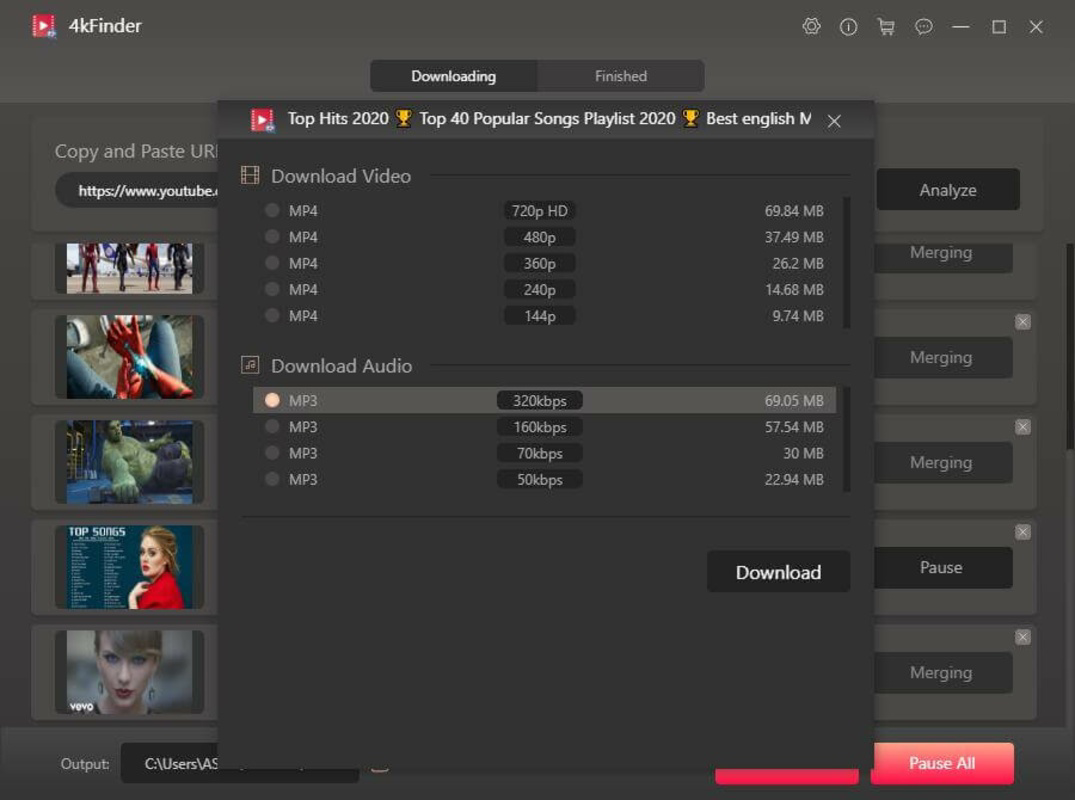
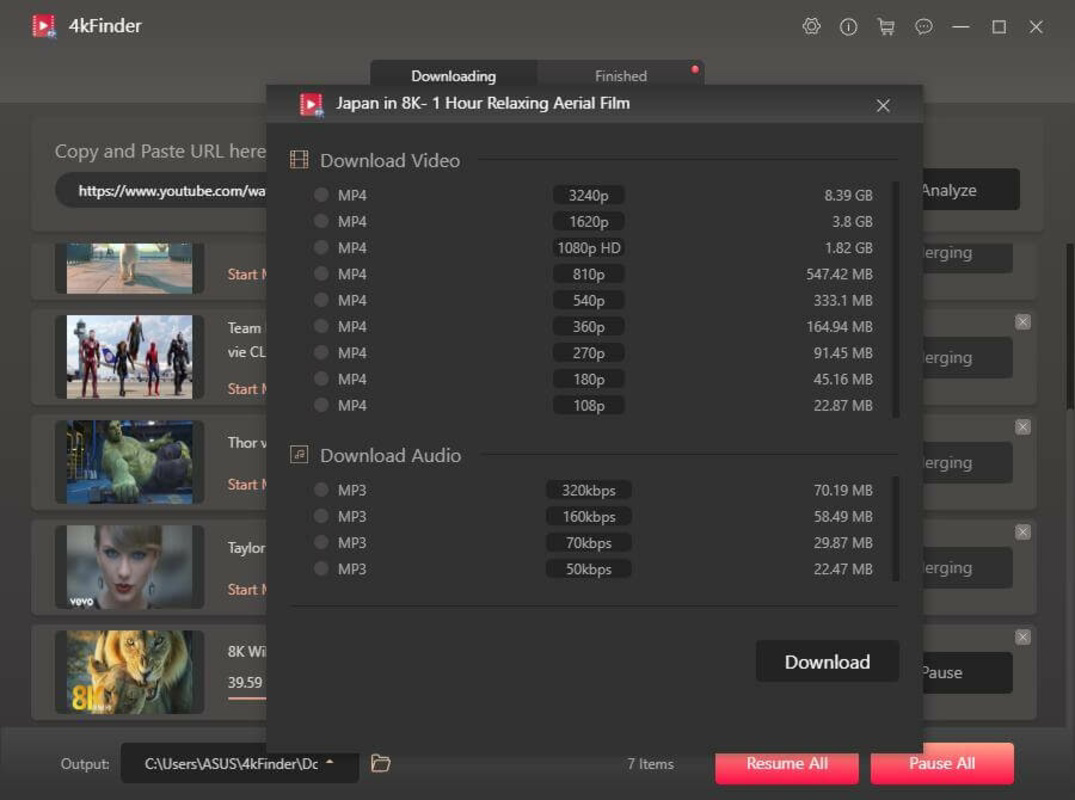
- High-Quality Format Conversion: Videos can be converted to MP4 and MP3 formats with output quality up to 8K resolution. Users can select preferred resolutions such as 4K, 1080P, or 720P, ensuring compatibility with various devices and playback systems.
- Efficient Bulk Downloading: The tool enables simultaneous downloading of multiple videos, with performance claims of up to 50X faster speeds compared to standard tools. This feature is ideal for users who need to save large volumes of content in a short time.
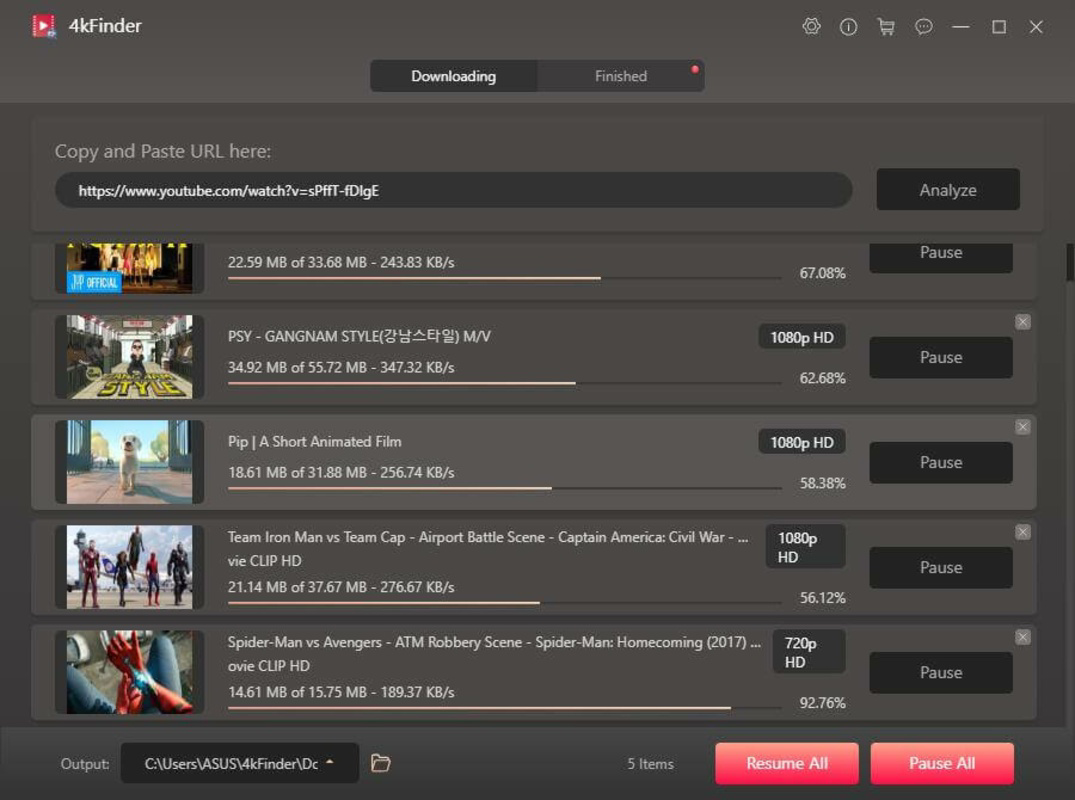
- Integrated Download Manager: A built-in manager tracks active and completed downloads, displaying progress, file size, and status. This helps users monitor multiple tasks and avoid missing any downloads during extended sessions.
- Free Trial with Limited Access: The trial version allows up to five downloads within a 15-day period, enabling users to test functionality before committing to the full version.
For example, a content creator might use the bulk download feature to gather reference footage from multiple sources, while a student could save lecture recordings in MP3 format for later review. The high-resolution output ensures that visual details remain sharp, even when viewed on large screens. The ability to convert video to audio also supports users who prioritize sound quality for podcasting or voice analysis.
Interface, UX & Performance
The interface of 4kFinder Video Downloader is described as intuitive and easy to navigate, with a clean layout focused on core functionality. Users can paste URLs into a central input field and initiate downloads with minimal steps, reducing friction during use. Visual cues such as progress bars and status indicators help maintain awareness of ongoing tasks, contributing to a seamless user experience.
Navigational flow is straightforward: paste URL → select format/resolution → start download → monitor via manager. This linear path minimizes user confusion and supports both beginners and advanced users. Although the developer did not list formal performance metrics, the app claims to deliver download speeds up to 50X faster than competitors, suggesting optimized backend processing.
Performance across different device categories is not explicitly detailed. However, given its file size of 45.3 MB and compatibility with Windows and macOS, it is likely designed to run efficiently on mid-range and high-end desktop systems. Responsiveness during bulk operations appears to be well-managed, with the download manager providing real-time updates. Stability is implied through the presence of a full-featured manager and no reported issues in the provided information.
Platform Compatibility & Technical Requirements
4kFinder Video Downloader is available for both Windows and macOS platforms, making it accessible to a broad desktop user base. The current version is 1.0.1, with a file size of 45.3 MB, indicating a lightweight installation that should not strain system resources. The app does not require extensive hardware specifications, though specific requirements were not listed.
The developer did not specify minimum OS versions or compatibility details beyond platform support. This lack of information means users should verify system compatibility before installation. No mobile versions were mentioned, confirming that the app is exclusively designed for desktop environments. The absence of mobile availability aligns with the tool’s focus on bulk processing and high-resolution downloads, which are better suited to larger screens and more powerful processors.
Pros and Cons
Pros
- Supports downloads from over 1000 websites, enhancing versatility.
- Offers high-quality output up to 8K resolution and multiple formats (MP4, MP3).
- Efficient bulk downloading with claimed speed improvements.
- Integrated download manager improves task visibility and control.
- Free trial allows testing before purchase.
Cons
- Price point of $49.95 may be high for casual users.
- No mobile version available for on-the-go access.
- Specific system requirements were not disclosed.
- Download speed claims lack independent verification.
- Only desktop platforms are supported.
FAQ
Is 4kFinder Video Downloader safe to use?
Yes, the app is designed to download videos directly from public websites without requiring additional plugins or third-party tools. The developer did not provide specific security details, but as long as users download from official sources and avoid suspicious links, the tool is considered secure.
Can I download videos from YouTube with this app?
Yes, the app supports downloads from YouTube and over 1000 other websites. Users can paste the video URL into the app and select their preferred format and resolution.
Does the app work on both Windows and macOS?
Yes, 4kFinder Video Downloader is compatible with both Windows and macOS platforms. No mobile versions were listed in the provided information.
What happens after the trial period ends?
After the 15-day trial period, users can continue using the app by purchasing the full version. The trial allows up to five downloads, after which full functionality requires a license.
Can I convert videos to audio using this tool?
Yes, the app supports conversion of video files to MP3 format, allowing users to extract audio for use in podcasts, music libraries, or voice notes.
Final Thoughts
4kFinder Video Downloader stands out as a powerful, feature-rich tool for users who need reliable, high-quality video downloads from a vast array of websites. Its ability to handle bulk downloads, support multiple formats, and deliver up to 8K output makes it a top-tier choice for content creators, educators, and digital archivists. While the $49.95 price tag may deter occasional users, the comprehensive feature set and trial option justify the investment for regular users.
With its intuitive interface and integrated download manager, the app delivers a smooth experience across both Windows and macOS. Although mobile support is absent and system requirements are unspecified, the desktop focus aligns with the app’s performance goals. For anyone seeking a secure, efficient way to download and convert online video content, 4kFinder Video Downloader offers strong value.
Download 4kFinder Video Downloader now
Guides & Tutorials for 4kFinder Video Downloader
How to install 4kFinder Video Downloader
- Click the Preview / Download button above.
- Once redirected, accept the terms and click Install.
- Wait for the 4kFinder Video Downloader download to finish on your device.
How to use 4kFinder Video Downloader
This software is primarily used for its core features described above. Open the app after installation to explore its capabilities.
User Reviews for 4kFinder Video Downloader 0
No reviews found


